
Best for
New lifestyle and on-model image sets for many products, published straight to each product.
Free plan, then from $9.99/month
Fulfily vs Shopify Magic & Sidekick
Looking for a Shopify Magic alternative for product photos? Fulfily is a Shopify app that creates full image sets, including on-model and lifestyle shots, for many products at once from their existing photos, titles and descriptions. Shopify Magic is Shopify's set of free built-in AI features, and Sidekick is its AI assistant, which also powers image editing in the file editor. They're a good fit for quick edits: a clean background, a new scene or more canvas.
Free plan · Built for Shopify · 5.0 on the Shopify App Store
Last updated:
Best for
New lifestyle and on-model image sets for many products, published straight to each product.
Free plan, then from $9.99/month
Best for
Free, quick edits to one image: a clean background, a new scene or a bigger canvas.
No additional cost, for a limited time
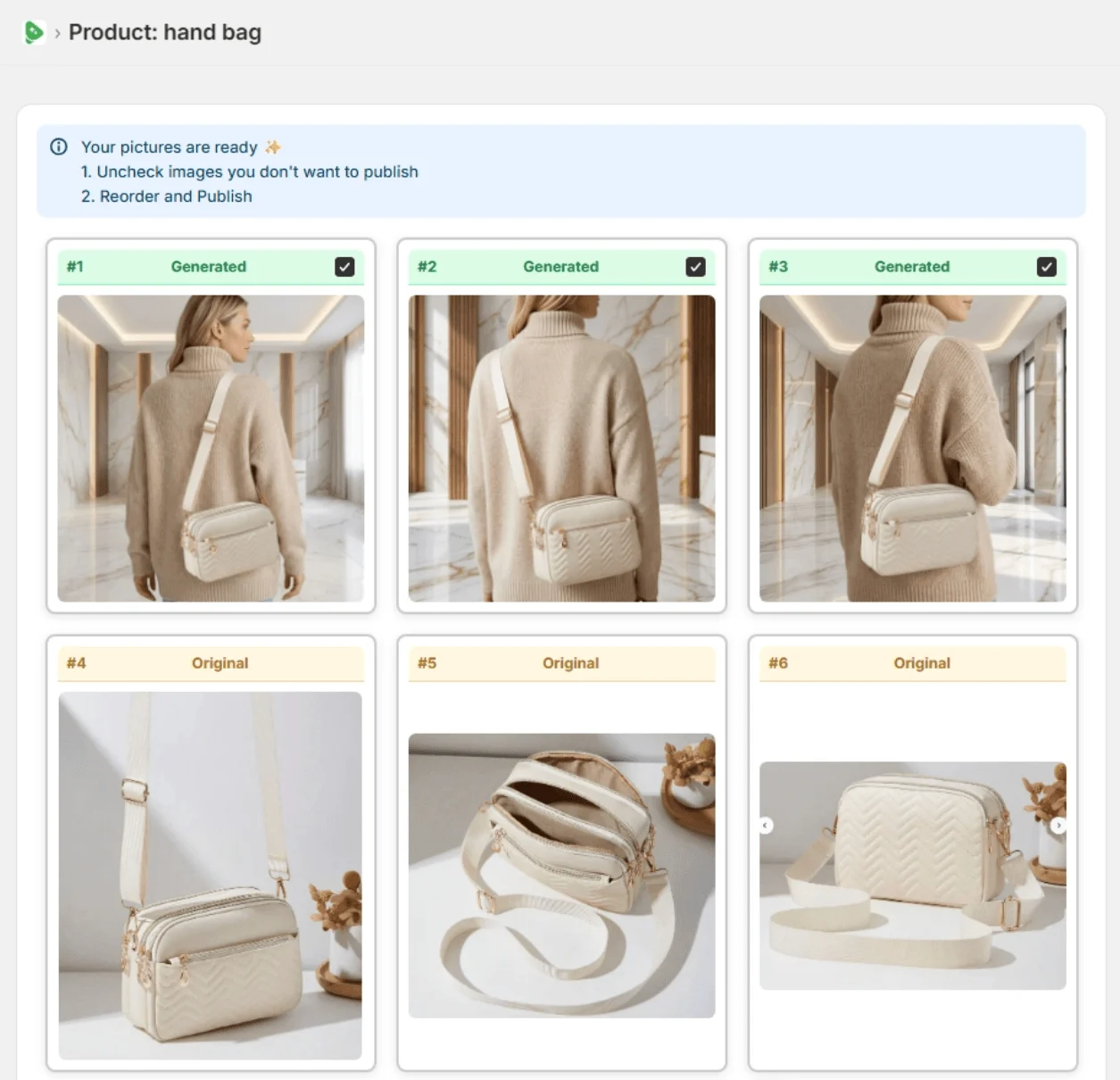
Both work inside your Shopify admin. Shopify Magic and Sidekick edit and create images from your own prompts, and the file editor makes one AI scene at a time. Fulfily is built for image sets: pick products, choose a ready-made preset with a photo model and pose, then review the results and publish them to each product.
No other tool to switch to
Clean shots for collection pages
Shopify's editor can also make the background transparent. Fulfily creates a new image of the product on white.
Describe the setting you want
Pick from 80+ looks instead of writing a prompt
Shopify's editor and Sidekick work from your own prompts, plus up to 3 reference images in Sidekick.
The product in the image is your product
In our test (May 2026, images below), Sidekick's images dropped the product's embroidered logo and patches.
Descriptions for search and accessibility
Shopify's media editor suggests alt text for images that don't have it. Fulfily adds alt text and a filename when it publishes.
No downloading and re-uploading
In Shopify, saving an edited product image updates it; images from the Sidekick chat are saved to your store's files. Fulfily publishes each selected image to the product's media.
Try it without paying
Fulfily: small free plan, then paid plans from $9.99/month. Shopify Magic: no additional cost, for a limited time.
In May 2026 we gave Shopify Sidekick and Fulfily the same two photos of a blue fitted cap with embroidered patches and asked each for product images. This is one test, and Sidekick may improve over time, but it shows what matters most for product photos.
What we saw: Sidekick's images left out the embroidered script logo, the patches and the horses on the visor, and one added a round sticker to the visor that isn't on the product. Its own reply called it "the clean blue fitted cap". Fulfily's images kept the logo, the patches and the visor embroidery. For product photos, the product has to stay your product.
Real Fulfily results: each image was generated from the plain product photo on the left with one of Fulfily's presets, with no retouching.
Step 1
Open Bulk Generate and tick the products you want new images for. Fulfily reads their photos, titles and descriptions.
Step 2
Start from a preset or pick a background, photo model and pose, right inside your Shopify admin.
Step 3
Keep the images you like, uncheck the rest and publish them to the product in one click.
Shopify Magic and Sidekick come at no additional cost on the Basic, Grow, Advanced and Plus plans (Shopify says this is for a limited time). Fulfily has a small free plan and paid plans from $9.99/month. See Fulfily's plans.
| Feature | Fulfily | Shopify Magic & Sidekick |
|---|---|---|
| What it is | A Shopify app that generates new product images | AI features built into Shopify: the file editor and the Sidekick assistant |
| Resolution | Medium (1K), High (2K) or Ultra (2K+) | 1 megapixel by default |
Using both: Shopify's built-in AI for fast fixes to a single photo, such as extending the canvas or switching to a solid background, and Fulfily when a product needs a new set of lifestyle or on-model images.
Merchant reviews


5-star feedback
"It's been an absolute pleasure working with Rolands and this app. The customer service has been 10/10 and the apps content generation is simply fantastic. Hop on this app before prices go up... :)"
Kiicitykiicity.com"I've tried quite a few AI image tools, and this is honestly one of the best I've used so far. The quality is very impressive. I'm currently using the Ultra setting with 2K resolution, and the results are consistently sharp and detailed."
Not quite. Shopify Magic is the name for Shopify's free AI features across the admin, and Sidekick is the AI assistant that's part of it. Shopify calls image editing in the file editor media generation with Sidekick, and you can also ask Sidekick to create images in its chat, so this page compares Fulfily with both.
Yes, for now. Shopify says media generation in the file editor is available at no additional cost on the Basic, Grow, Advanced and Plus plans for a limited time.
Shopify's documentation doesn't describe a dedicated feature for putting products on models, but Sidekick can generate images from your prompt and up to 3 reference images, so you can try it. In our test on an embroidered cap, Sidekick's images left out the logo and patches, which matters when the product has to look exactly like yours. Fulfily has ready-made photo models and poses built into its presets.
Shopify's file editor creates one AI-generated scene at a time. Fulfily lets you select several products and generate images for each of them in one run.
No. Shopify Magic and Sidekick come with your store and Fulfily is a separate app, so you can use Shopify's AI for quick edits and Fulfily for new image sets.
Start on the free plan. Pick products from your Shopify catalog and get new images in minutes.


Checked on the vendors' own pages in September 2026. Features and prices change, so check the linked pages before you decide.