
Best for
Stores that want new product images made and published without leaving Shopify.
Free plan, then from $9.99/month
Fulfily vs Pixelcut
Looking for a Pixelcut alternative for your Shopify store? Fulfily is a Shopify app: it creates new lifestyle and on-model images from each product's photos, title and description, and publishes the ones you pick to the product. Pixelcut is an AI photo editor and creative app for the web, iOS and Android, known for background removal and upscaling, with AI product photos, video, batch editing and an API. It was briefly renamed Pixa and has since gone back to Pixelcut.
Free plan · Built for Shopify · 5.0 on the Shopify App Store
Last updated:
Best for
Stores that want new product images made and published without leaving Shopify.
Free plan, then from $9.99/month
Best for
Fast cutouts, upscaling and batch edits, plus AI images and video, on the web and phone.
Free plan; Pro $10/month
Pixelcut is an all-round creative editor: you upload images, edit or generate them with the AI model of your choice, and export. Fulfily starts from your Shopify catalog instead: it reads each product's photos and details, applies a preset with a photo model and pose to the products you select, and publishes the results to each one.
Reads your products and publishes images back
No app on the Shopify App Store (searched September 27, 2026). You export images from Pixelcut and upload them to Shopify yourself.
Simple shots for collection pages
Pixelcut removes the background, unlimited on paid plans. Fulfily creates a new image of the product on white.
Put the product in a new setting
Show size and fit on a person
Pixelcut: On Model scenes with AI models or ready-made personas. Fulfily: photo models and poses inside its presets.
Pick from 80+ looks instead of writing a prompt
Pixelcut's Product Studio has a library of ready-made studio and lifestyle scenes and ready-made personas for on-model shots.
Update a whole collection in one go
Pixelcut: batch editing across whole folders of images.
Work on your phone
Pixelcut has iOS and Android apps. Fulfily works on your phone inside the Shopify mobile app or any browser.
Automate image editing from your own systems
Try it without paying
Pixelcut's free plan includes basic editing such as background removal and upscaling.
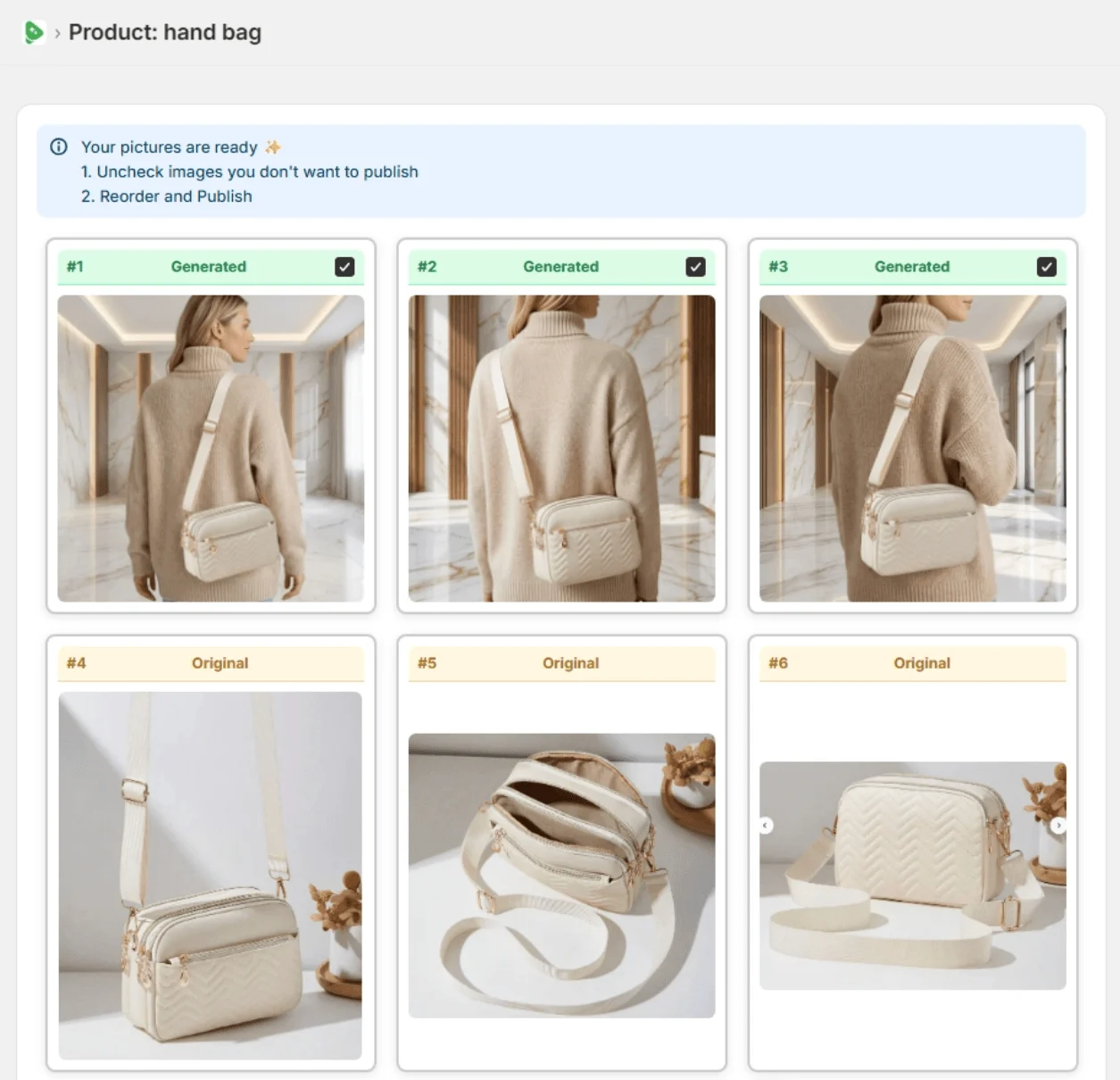
Real Fulfily results: each image was generated from the plain product photo on the left with one of Fulfily's presets, with no retouching.
Step 1
Open Bulk Generate and tick the products you want new images for. Fulfily reads their photos, titles and descriptions.
Step 2
Start from a preset or pick a background, photo model and pose, right inside your Shopify admin.
Step 3
Keep the images you like, uncheck the rest and publish them to the product in one click.
Plans and prices side by side, with how many AI images each plan makes. Estimates are marked as such.
| Pricing | Fulfily | Pixelcut |
|---|---|---|
| Free plan | Yes, small free plan available | Yes: basic editing such as background removal and upscaling |
| Free trial | 7-day free trial on Starter | Not listed on the pricing page |
| Paid plans, per month | Starter $9.99/month: about 65 images at High (2K)Essential $33/month: about 215 images at High (2K)Plus $95/month: about 645 images at High (2K), up to 10× with the multiplier | Pro $10/month: about 20 images a month with a top AI model, plus up to 300 AI backgrounds a dayBusiness from $30/month: about 120 images a month with a top AI model (more on larger tiers), plus up to 1,200 AI backgrounds a day |
| Yearly billing | 30% off with yearly billing | 20% off with yearly billing: Pro $8, Business $24 per month |
| Feature | Fulfily | Pixelcut |
|---|---|---|
| What it is | A Shopify app that generates new product images | An AI photo editor and creative app for images and video |
| Where you work | Inside your Shopify admin | Pixelcut's web, iOS and Android apps, plus an API |
Using both: Pixelcut for quick cutouts and upscales of your raw photos, and Fulfily for the lifestyle and on-model sets that go on each product page.
Merchant reviews

5-star feedback
"It's been an absolute pleasure working with Rolands and this app. The customer service has been 10/10 and the apps content generation is simply fantastic. Hop on this app before prices go up... :)"
Kiicitykiicity.com"I've tried quite a few AI image tools, and this is honestly one of the best I've used so far. The quality is very impressive. I'm currently using the Ultra setting with 2K resolution, and the results are consistently sharp and detailed."
Yes. Pixelcut renamed its app to Pixa for a few months and then went back to Pixelcut. Pixelcut says accounts, subscriptions and credits carried over, so it's the same app.
We didn't find one on the Shopify App Store when we searched on September 27, 2026. Pixelcut runs on the web, iOS and Android, so you export images there and upload them to Shopify yourself.
Pixelcut's pricing page lists a free plan, Pro at $10/month (about 20 images a month with a top AI model, plus up to 300 AI backgrounds a day) and Business from $30/month, with 20% off on yearly billing ($8 and $24 a month).
Yes, with presets such as Clean White Catalog, which create a new image of the product on white. For transparent cutouts or upscaling an existing photo, an editor like Pixelcut is the better tool.
Start on the free plan. Pick products from your Shopify catalog and get new images in minutes.



Checked on the vendors' own pages in September 2026. Features and prices change, so check the linked pages before you decide.