
Best for
Consistent image sets for many Shopify products, from presets, published straight to each product.
Free plan, then from $9.99/month
Fulfily vs ChatGPT
Can you make Shopify product photos with ChatGPT? Yes: attach a product photo, describe the scene you want, and ChatGPT generates a new image in the chat. Fulfily works differently. It's a Shopify app that wraps image generation in a workflow for your catalog: it reads each product's photos, title and description, applies a ready-made preset to the products you select, and publishes the images you keep to each product.
Free plan · Built for Shopify · 5.0 on the Shopify App Store
Last updated:
Best for
Consistent image sets for many Shopify products, from presets, published straight to each product.
Free plan, then from $9.99/month
Best for
One-off images and ideas from a prompt, in an assistant you may already use for writing and research.
Free plan; paid plans from €8/month (EU prices)
The difference isn't the image model, it's everything around it. In ChatGPT you work in a conversation: write a prompt, attach a photo, refine, then save the images you like and get them onto your products. Fulfily starts from your Shopify catalog: select products, pick a preset with a photo model and pose, review the results and publish them with alt text. For a catalog, that's one run for many products, with images created in the background, instead of a prompt per product.
Start from your product list, not a blank chat
It works the other way round: the Shopify plugin for ChatGPT connects your store to a ChatGPT chat.
No downloading and re-uploading
ChatGPT: through the Shopify plugin for ChatGPT, by attaching the image in the chat and naming the product. Fulfily publishes each selected image with alt text and a filename.
Describe the setting you want
Pick from 80+ looks instead of writing a prompt
ChatGPT offers general style filters and templates, not product-photo presets with photo models and poses; you describe each product shot in a prompt.
Work on your phone
ChatGPT has iOS and Android apps. Fulfily works on your phone inside the Shopify mobile app or any browser.
Writing, research and images in one place
Fulfily only makes product images.
Try it without paying
ChatGPT Free has limited and slower image generation.
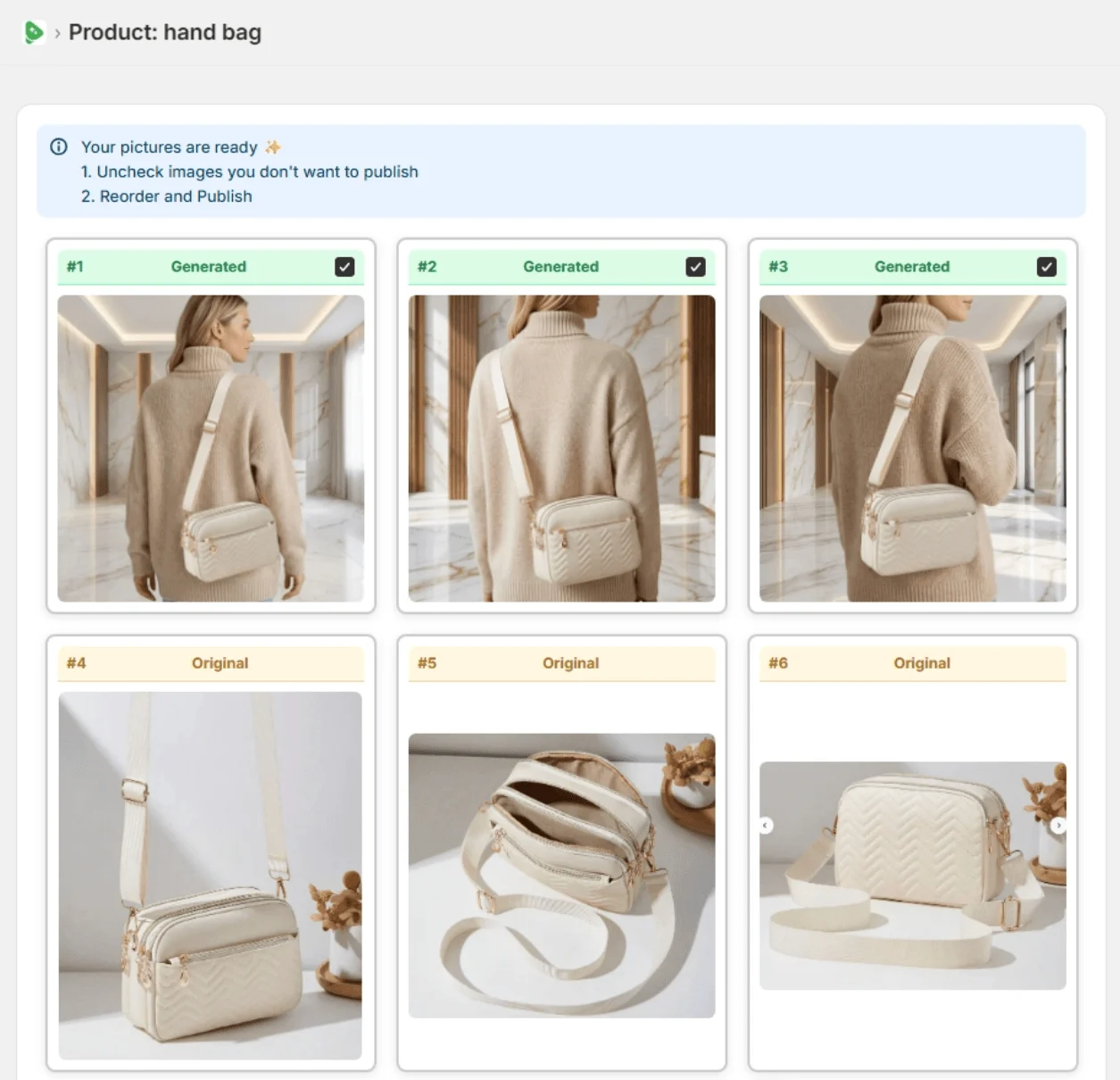
Real Fulfily results: each image was generated from the plain product photo on the left with one of Fulfily's presets, with no retouching.
Step 1
Open Bulk Generate and tick the products you want new images for. Fulfily reads their photos, titles and descriptions.
Step 2
Start from a preset or pick a background, photo model and pose, right inside your Shopify admin.
Step 3
Keep the images you like, uncheck the rest and publish them to the product in one click.
Plans and prices side by side, with how many AI images each plan makes. Estimates are marked as such.
| Pricing | Fulfily | ChatGPT |
|---|---|---|
| Free plan | Yes, small free plan available | Yes: about 2–3 images a day (estimate) |
| Free trial | 7-day free trial on Starter | Not listed on the pricing page |
| Paid plans, per month | Starter $9.99/month: about 65 images at High (2K)Essential $33/month: about 215 images at High (2K)Plus $95/month: about 645 images at High (2K), up to 10× with the multiplier | Go €8/month: image limit not publishedPlus €23/month: about 40–50 images per 3 hours (estimate)Pro from €103/month: unlimited (fair-use limits apply) |
| How images are made | Several images per product are made at the same time, for several products at once, in the background. | In our testing (September 2026), images were made one after another in the chat, one product at a time. Image limits are a cap, not a pace: at one image at a time, hundreds of images mean hours of prompting and saving. |
| Yearly billing | 30% off with yearly billing | No yearly discount on Go, Plus or Pro; OpenAI lists yearly plans only for Business and Enterprise |
| Feature | Fulfily | ChatGPT |
|---|---|---|
| What it is | A Shopify app that generates new product images | OpenAI's general AI assistant, with image generation built in |
| Where you work | Inside your Shopify admin | ChatGPT on the web, iOS or Android |
| How you ask for an image | Pick one of 80+ presets, or describe your own scene | Write a prompt, optionally with a photo attached |
Using both: ChatGPT for brainstorming scene ideas and writing product copy, and Fulfily when a collection needs a consistent set of product images on the store.
Merchant reviews

5-star feedback
"It's been an absolute pleasure working with Rolands and this app. The customer service has been 10/10 and the apps content generation is simply fantastic. Hop on this app before prices go up... :)"
Kiicitykiicity.com"I've tried quite a few AI image tools, and this is honestly one of the best I've used so far. The quality is very impressive. I'm currently using the Ultra setting with 2K resolution, and the results are consistently sharp and detailed."
Yes. Attach a product photo in ChatGPT and describe the scene you want, and it generates a new image. You then add the image to your product, either in your Shopify admin or through the Shopify plugin for ChatGPT, which can add an image you attach in the chat to a product.
That isn't the comparison we'd make. ChatGPT is a general assistant that can generate images; Fulfily is a Shopify app built around the steps a store needs: it reads each product's photos, title and description, offers ready-made presets with photo models and poses, generates for several products in one run, and publishes the images you choose.
In the EU, OpenAI lists ChatGPT Free, Go at €8/month, Plus at €23/month and Pro from €103/month. OpenAI doesn't publish image limits: Free is about 2–3 images a day and Plus roughly 40–50 every 3 hours by user reports, and Pro is unlimited within OpenAI's abuse guardrails.
Yes. They don't overlap much: a chat assistant is handy for product copy and ideas, and a Shopify app like Fulfily for the product images themselves.
Start on the free plan. Pick products from your Shopify catalog and get new images in minutes.


Checked on the vendors' own pages in September 2026. Features and prices change, so check the linked pages before you decide.