
Best for
Shopify stores that want images built from each product's own photos, title and description.
Free plan, then from $9.99/month
Fulfily vs Photoroom
Looking for a Photoroom alternative for your Shopify store? Fulfily is a Shopify app that works inside your admin and turns each product's existing photos, title and description into new images you review and publish. Photoroom is an AI photo editor with web and mobile apps, background removal, templates and an API, and it can sync with Shopify on its higher plans.
Free plan · Built for Shopify · 5.0 on the Shopify App Store
Last updated:
Best for
Shopify stores that want images built from each product's own photos, title and description.
Free plan, then from $9.99/month

Best for
AI photo editor across web, mobile and marketplaces, with cutouts, templates and an API.
Free plan (no commercial use), then paid plans
Fulfily runs inside your Shopify admin on every plan, including the free one: it reads each product's photos, title and description and publishes the new images to the product in one click. Photoroom is a separate editor on the web, mobile and API; its pricing page lists the Shopify integration from the Max plan.
Import products and publish images back
Photoroom's pricing lists the Shopify integration from the Max plan.
Shopify's own quality badge for apps
As shown on each app's Shopify App Store listing.
Simple shots for collection pages
Photoroom cuts the product out, including onto a transparent background. Fulfily creates a new image of the product on white.
Put the product in a new setting
Show size and fit on a person
Photoroom: AI fashion models on paid plans.
Update a whole collection in one go
Written for you, ready for search
Photoroom's Shopify app generates alt text across your catalog. Fulfily adds alt text and a filename when it publishes.
Work on your phone
Photoroom has native iOS and Android apps. Fulfily works on your phone inside the Shopify mobile app or any browser.
Automate image editing from your own systems
Marketplaces, social media and ads
Try it without paying
Photoroom's free plan is for non-commercial use.
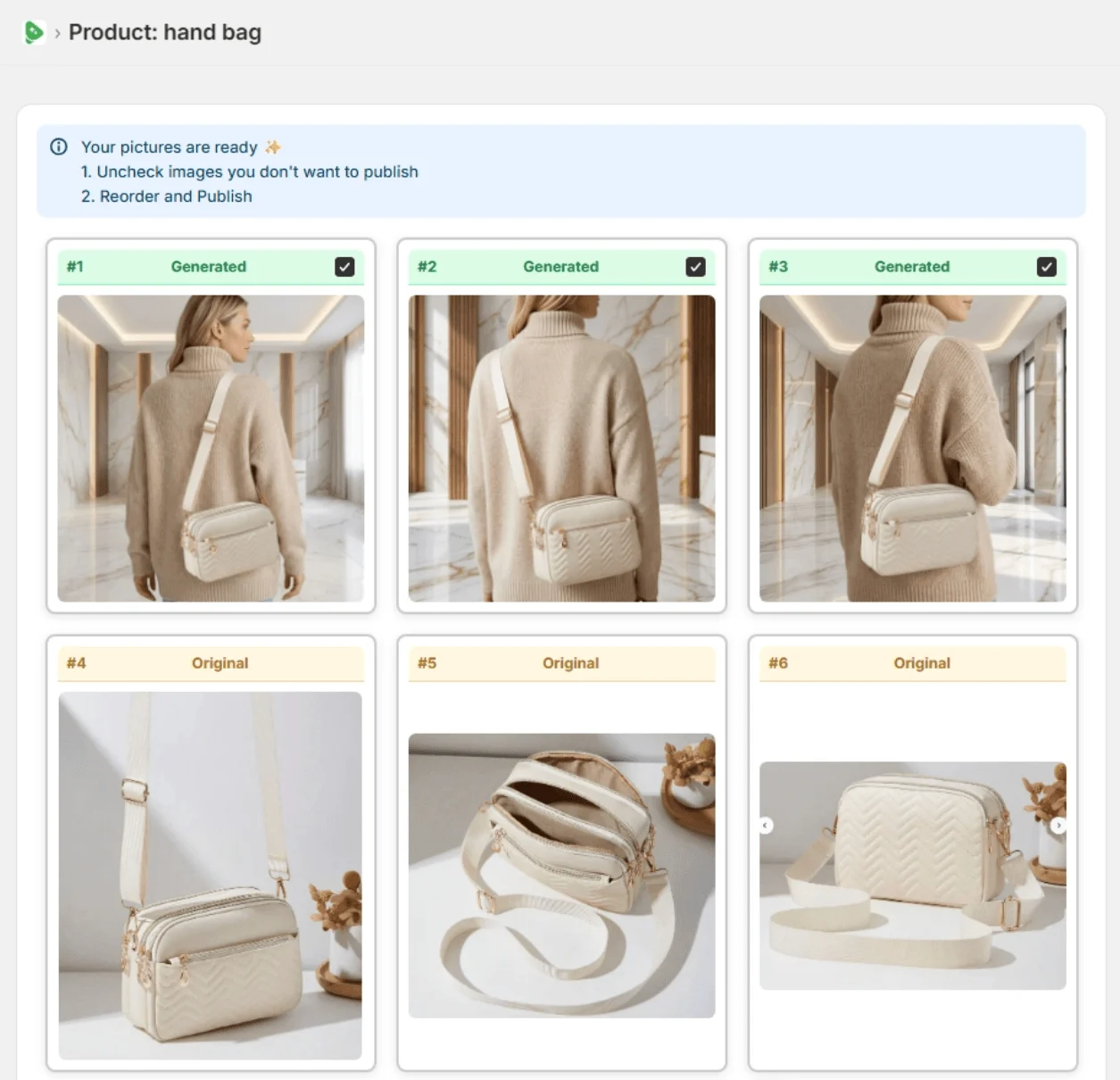
Real Fulfily results: each image was generated from the plain product photo on the left with one of Fulfily's presets, with no retouching.
Step 1
Open Bulk Generate and tick the products you want new images for. Fulfily reads their photos, titles and descriptions.
Step 2
Start from a preset or pick a background, photo model and pose, right inside your Shopify admin.
Step 3
Keep the images you like, uncheck the rest and publish them to the product in one click.
Plans and prices side by side, with how many AI images each plan makes. Estimates are marked as such.
| Pricing | Fulfily | Photoroom |
|---|---|---|
| Free plan | Yes, small free plan available | Yes, with limited features and no commercial use |
| Free trial | 7-day free trial on Starter | Yes, on Pro and Max |
| Paid plans, per month | Starter $9.99/month: about 65 images at High (2K)Essential $33/month: about 215 images at High (2K)Plus $95/month: about 645 images at High (2K), up to 10× with the multiplier | Pro €9.99/month: 2K AI fashion model images not included (1K only)Max €26.99/month: up to 185 AI fashion model images at 2K; adds the Shopify integrationUltra €99/month: up to 555 AI fashion model images at 2KEnterprise: custom price |
| Yearly billing | 30% off with yearly billing | Yearly billing: Pro €5.99, Max €14.50, Ultra €82.50 per month (40%, 46% and 17% off) |
| Feature | Fulfily | Photoroom |
|---|---|---|
| What it is | A Shopify app that generates new product images | An AI photo editor with web and mobile apps, templates and an API |
| Where you work | Inside your Shopify admin | Photoroom's web and mobile apps, plus its AI Listing Assistant app for Shopify |
Using both: Some stores clean up raw photos in a general editor first, then use a Shopify-native tool for the lifestyle and on-model images that go on the product page.
Merchant reviews


5-star feedback
"It's been an absolute pleasure working with Rolands and this app. The customer service has been 10/10 and the apps content generation is simply fantastic. Hop on this app before prices go up... :)"
Kiicitykiicity.com"I've tried quite a few AI image tools, and this is honestly one of the best I've used so far. The quality is very impressive. I'm currently using the Ultra setting with 2K resolution, and the results are consistently sharp and detailed."
Yes. Photoroom's free AI Listing Assistant app on the Shopify App Store imports your product catalog and publishes edits back, and Photoroom's pricing lists the Shopify integration from the Max plan up.
Photoroom has a free plan with limited access to features and exports, and it doesn't allow commercial use. Its paid plans are Pro, Max, Ultra and Enterprise.
Both can put products on AI models. Photoroom offers AI fashion models on its paid plans; Fulfily uses photo models and poses inside its presets and builds each image from the product's own photos and description.
Yes. Fulfily can put your product on a plain white background, for example with the Clean White Catalog preset. It creates a new image of the product on white rather than cutting it out, so if you need a transparent cutout, a dedicated editor like Photoroom is the better fit.
Start on the free plan. Pick products from your Shopify catalog and get new images in minutes.



Checked on the vendors' own pages in September 2026. Features and prices change, so check the linked pages before you decide.